


If you’ve spent any time working in test automation, you know the drill:
- We start every project with the best intentions — promising ourselves we’ll write clean, maintainable code
- But fast forward a few months, and we’re spending half our week fixing flaky tests, hunting down brittle locators, and dealing with “duplicate email” errors in our CI/CD pipelines
I’ve been there. We’ve all been there.

Recently, the automation community has been buzzing about AI-driven testing:
- I read articles over on the Microsoft Developer Blog and TestGuild about how AI is taking over QA in 2025 and 2026
- If I’m honest, I was a bit skeptical — a lot of AI testing platforms feel like black boxes
- They promise the world, but you end up locked into their ecosystem, losing control of your actual codebase
But then I tried Playwright Agents. This wasn’t a paid wrapper tool; this was native to the Playwright ecosystem I already use and love.
That was about a month ago. Since then, I’ve been using Playwright Agents daily on a live project:
- Writing new suites
- Debugging failures
- Onboarding teammates
- Watching how the agents behave over real sprints with real deadlines
This post isn’t a first-impression review. It’s what I’ve learned after a full month of relying on these agents in production-grade work. Here is my honest experience of how it completely changed the way I look at writing tests.
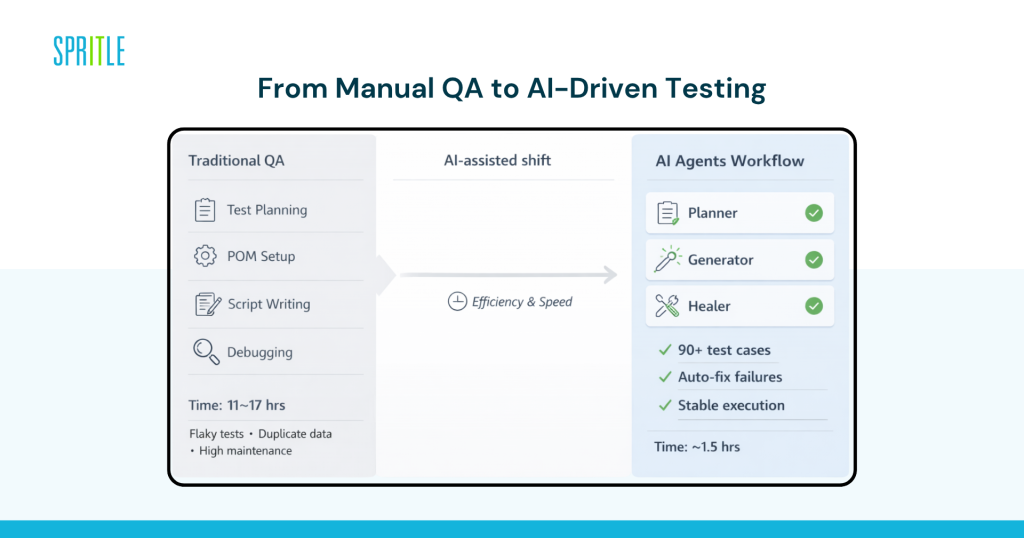
The Challenge: The User Management Module
I needed to automate the User Management module for our CII-ESG Diagnostics Platform. If you’ve automated one of these, you’ve automated a hundred: Create, Read, Update, and Delete users.
But doing it right takes time. If I were to write this manually, here is what my week would look like:
- Spend an afternoon clicking through the app to write a test plan
- Spend a few hours writing the Page Object Model (POM) classes
- Spend a couple of days actually scripting the happy paths, the form validations, the error states, and the edge cases
All in all, I’d be budgeting 11 to 17 hours for this one module.
Instead, I ran npx playwright init-agents to fire up the new Model Context Protocol (MCP) agents in my editor and decided to let the AI take the wheel.
Meet My New Pair Programmer: The Planner
Playwright includes a sub-agent called the Planner. I basically told it, “Hey, go figure out how this User Management module works.” I provided a simple seed test so it could log in, and then I just watched.
It didn’t just poke around. Here’s what the Planner actually did:
- Systematically explored the app and generated a human-readable Markdown test plan
- Didn’t just write a “create user” happy path — it identified 90+ distinct test scenarios across 8 suites
- Planned tests for role-based permissions, what happens if I enter an email that already exists, and how the UI handles very long inputs
- Mapped out edge cases in minutes that would have taken me hours to properly document
Writing the Code: The Generator
Having a text file full of test plans is nice, but I needed code. Enter the Generator agent.
I gave it the test plan, and it started writing TypeScript. My biggest fear was that it would write garbage, unmaintainable code — like hardcoding delays (page.waitForTimeout(5000)) or using terrible CSS locators (#div-child-3 > span).
I was wrong. The code it generated was exactly how an experienced QA engineer would write it:
- It built Page Object Models: Separated the locators from the test logic, giving me clean CreateUserPage.ts and UserManagementPage.ts files
- It cared about accessibility: Heavily used locators like page.getByRole(‘button’, { name: ‘Submit’ }) instead of relying on brittle class names
- It understood dynamic data: To avoid those annoying “User already exists” errors when tests run twice, it automatically generated timestamp-based dynamic emails (const uniqueEmail = test.user.${Date.now()}@example.com)
It wrote over 1,500 lines of functional test code for those 90+ scenarios.
The Results Add Up
So, what was the final tally?
- What usually takes me nearly two days of solid heads-down work was finished in roughly 1.5 hours. That is a 90% reduction in development time
- When I ran the suite, I got a 100% pass rate — no false positives, no flakiness
And here’s what really matters: those numbers held up over an entire month.
- I’ve now pushed multiple modules through this same workflow — User Management, Project Creation, Role Permissions
- The time savings and pass rates have been remarkably consistent
- This isn’t a cherry-picked demo result; it’s a pattern I’ve seen repeat itself sprint after sprint
The Maintenance Lifesaver: The Healer
We all know the worst part of automation isn’t writing the tests — it’s maintaining them:
- A developer renames a button class, or changes an ID
- Suddenly your whole CI pipeline is painted red
This is where the third agent genuinely surprised me: the Healer.
Instead of me spending an hour digging through trace viewers, the Healer just jumps in:
- When a test fails, it automatically replays the failing steps
- Inspects the current live UI to find where the elements moved to
- Figures out what changed and literally suggests a patch — like an updated locator, a data fix, or an adjusted wait
- Re-runs the test until it passes
Over the past month, the Healer has saved me more time than any other agent:
- Our frontend team ships UI changes regularly
- There were at least a dozen times where my CI pipeline went red after a developer renamed a component or restructured a form
- Each time, the Healer caught it, proposed a fix, and I just reviewed the diff
- What used to be a dreaded Monday-morning “fix the pipeline” ritual has quietly disappeared from my calendar
It feels like having a junior QA engineer automatically triage your broken tests overnight, so you just have to review their suggested code patches in the morning.
The Bigger Picture — And What’s Coming Next
I was reading an article on DEV Community recently where a developer tested Playwright’s new agents against expensive, standalone AI testing platforms. Their takeaway perfectly matched my own experience: Ownership matters.
With Playwright Agents, I still own my code:
- I have standard TypeScript .spec.ts files that live in my GitHub repo
- I can run them in CI/CD via Jenkins or GitHub Actions just like any other Playwright test
- I’m not paying a monthly subscription for a magic platform
- I’m just augmenting my normal workflow with a lot of intelligence
After a full month of daily use, I can say with confidence: this isn’t hype.
- The Planner, Generator, and Healer genuinely changed how I work. I went from spending the majority of my week writing and maintaining test code to spending my time reviewing test code — which, honestly, is a much better use of a QA engineer’s brain
- My test coverage has grown faster than it ever has on any project. The maintenance burden has dropped to nearly nothing
Are QA engineers going out of a job? Absolutely not.
- Our job isn’t typing out page.locator().click()
- Our job is ensuring quality
- Playwright agents just handle the tedious typing, giving me my time back so I can focus on harder, more strategic testing problems
If you’re drowning in manual test creation, do yourself a favor:
- Update your Playwright CLI
- Fire up the agents and give it a try
Don’t just take my word for one afternoon’s experiment — run it for a month like I did, and I’m confident you’ll never go back


